
Recent updates: Notes AI, Calendar week view and other changes
At Start.me, we roll out updates several times a week. Most of them are small fixes and improvements that make things run more smoothly.
This time, we’ve focused on four areas: the Notes widget, moving widgets around your page, the Calendar, and the To-do widget.
Here’s what’s new:
Improve your Notes with AI

We’ve added a new magic wand button to the Notes widget.
Here’s how it works:
- Select some text, or press Ctrl-A to select everything.
- Click the wand to choose one of these options:
- Improve writing – We’ll suggest a clearer version of your selection.
- Fix spelling & grammar – We’ll correct any mistakes we find.
- Make shorter – We’ll summarize your selection.
- Make longer – We’ll expand on your text.
After you choose an option, we’ll start updating your text. This might take a few seconds, depending on the length. When it’s ready, you can Accept the changes or Undo to return to your original text.
New Widget DnD

You’ve always been able to move widgets around your page — to another column, or just up and down. You could do this from the widget menu (Move), or by clicking Organize widgets.
Now there’s a new way: Drag and Drop. Just click and hold the header of a widget to pick it up. You’ll see a live preview that helps you drop it in the right spot, without losing context.
The original methods still work too, if you prefer those.
Calendar: week view

Our Calendar widget just got a solid update. We’ve added a Week view, so you can focus on your schedule without the clutter. The Monthly and Running views are still there, of course.
You’ll also notice more color options for calendars added by URL. And if you’re using Google Calendar, we now mirror the same familiar colors you use there.
Behind the scenes, we’ve made it faster to load and fixed some bugs—especially around time zones and recurring events.
The Calendar widget is part of our PRO subscription. Want to try it out? Upgrade and take a look.
Todo widget
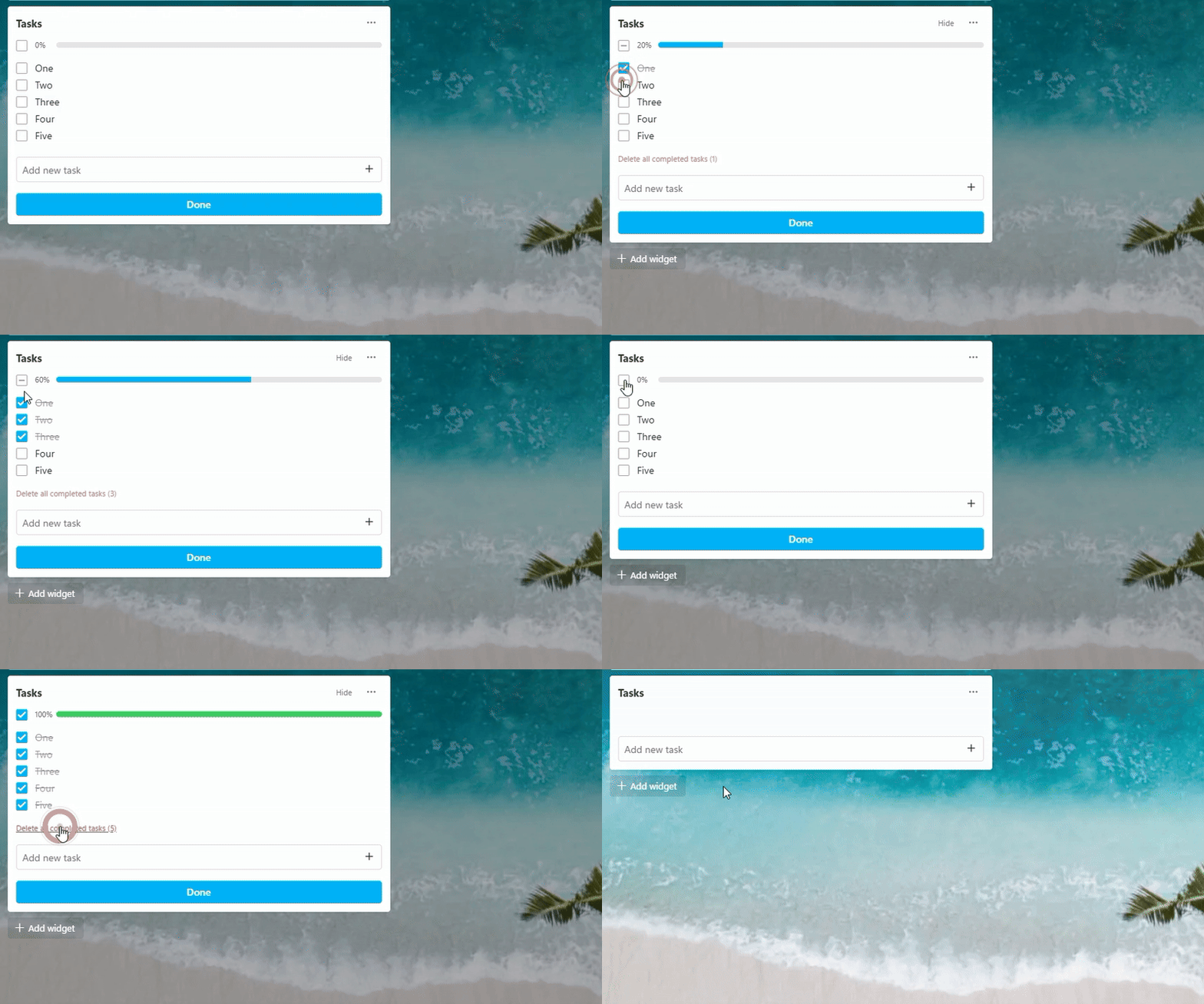
And finally, we’ve made a few small but helpful improvements to the To-do widget:
You can now mark all tasks as done with a single click. And once they’re done, you can remove them just as easily.
Tidying up your to-do list has never been this quick.
What’s next?
Most of these updates began as user requests. If you have ideas to make Start.me better, drop them in the comments. We’re listening!
14 Replies to “Recent updates: Notes AI, Calendar week view and other changes”
Thanks for sharing!
You’re welcome, Sarath!
I’d love a Bookmarks widget feature to auto-organize the bookmarks in order of most used bookmarks dynamically, so my most used are always right at the top. Not a simply a Sort option (although that would be a step towards this), but that would reorder the bookmarks automatically based on how often they are used. If there is concern about causing confusion in the core Bookmarks widget, perhaps a new “Smart Bookmark Widget” or :”AI Bookmark Widget” that can auto-organize bookmarks in order of most used. Similarly, there may be users that wish to auto-organize bookmarks to show just the last 5 most recently used bookmarks, 10, etc.
Hi Matt, Thanks for commenting en requesting a new auto-organize feature. Honestly, this idea has come up in the past, and at that time we decided to stick with the manual sort option. That’s Edit > Sort > Newest. We know, it’s three clicks, but that all there is to it. We did add a new feature recently: a toggle in the Display settings where you can decide if you want new bookmarks to appear at the top or a the bottom of a bookmarks list. If you toggle this on, you don’t need an automatic reordering, as it always displays the recently added bookmarks to the top. You can read about it here: https://support.start.me/en/articles/9182899 And as for the option to display only the five (or 10) most recently added bookmarks, you can set this in the Display setting of every Bookmarks widget: More menu > Display settings > Visible bookmarks. Does this answer your request?
He asked about the *most used* not the newest added bookmark. I support this idea, with the analytics enabled, unused bookmarks can be sorted to the end and an option to hide or even remove bookmarks after a certain time would be great.
Yes! Exactly! Perhaps I didn’t explain myself well, but Patrick has it exactly right.
I go to great lengths to name my bookmarks in a way that allows them to sort in a way that is most useful to me. I personally don’t like it when the order changes on me like like it would if you applied a “most often used” order. Where am I to easily find that bookmark that I need once every month or so? If I’ve named and alphabetized it appropriately, I want it to always show up in the alphabetical order I’ve selected. Please don’t mess with my setting like this.
Hi Brenda, thanks for sharing this — it’s a very fair concern. Start.me does not automatically reorder your bookmarks. If you’ve named and arranged them alphabetically (or in any custom order), that order will stay exactly as you set it. We believe organization should remain fully under the user’s control, not be driven by usage algorithms.
Any sorting options in Start.me are always explicit and opt-in, so nothing changes unless you choose it.
I guess I haven’t been using your widgets, or at least not knowingly. What’s the relationship between your Notes widget and
Google Notes, which I’ve been using all along?
Hi William, thanks for asking. Our notes widget is a dedicated Start.me widget, with no connection to Google Notes (or Google Keep). They are simply two different services. Our integration with Google is limited to Google Calendar, Google Adsense, and Google Tasks. For Gmail we have a workaround. You can find detailed information in our knowledgebase: https://support.start.me If you have any more questions, please let me know.
Link to local directory of file
Hi Jan, to link to a local file, you’ll can install one of our extensions, and grant us access to local files. Then, you can link to them. Note: we don’t save the contents of the local files, only its location. For a detailed instruction, please read this support article: https://support.start.me/en/articles/9182864-how-do-i-link-to-local-folders-files Thanks for reaching out!
Good job, team!
Thanks, Eugene!