
Start.me update: a fresher look and a few new options
We’ve refreshed the design across Start.me, making menus, dialogs, and widgets more consistent. The result is a cleaner, calmer interface that looks better in both light and dark mode. Did you notice it already?
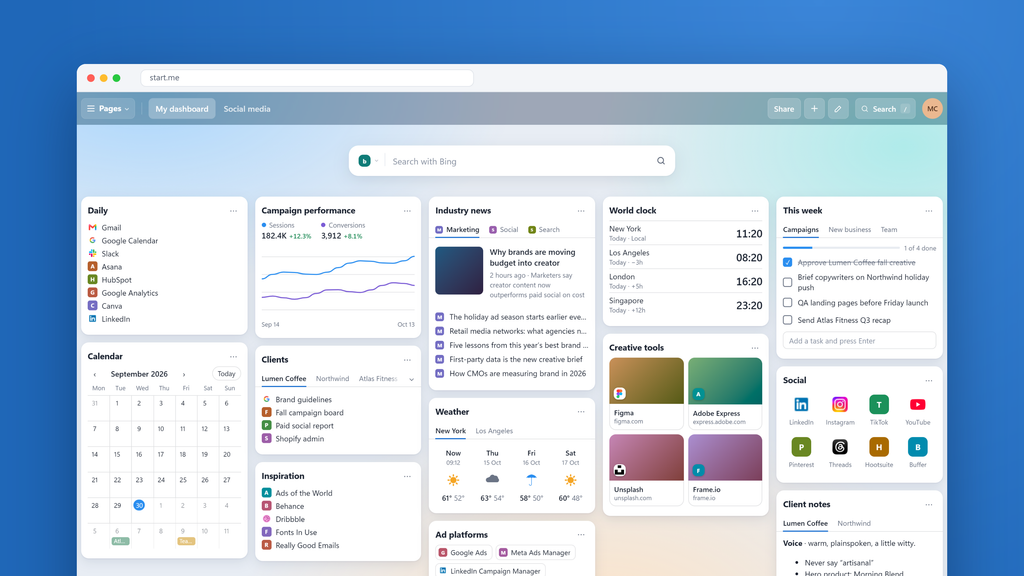
What’s new?
The design pass touched the whole app, but we also updated many widgets and modals on their own. Here are some examples of changes we made:
- Dark mode: System theme
We added support for a System theme option so Start.me can follow your device’s light or dark mode automatically. You will find it in the user menu next to Light and Dark. - Charts
Editing chart data and options now happens in one modal, so you are not hunting for controls on the page. You can pick the chart type there (including stacked columns and donut) and work with your table in the same place. If the chart reads from a URL, the preview shows that live source so you can confirm the link is right. - Image gallery
The gallery widget was rebuilt so adding images and using the controls is more straightforward day to day. In the editor, a thumbnail strip helps you see all images at a glance, select one, and drag to reorder. - Pomodoro
Pomodoro can roll into the next work block or break automatically when a session ends. When a timer finishes, you now hear a short sound (and a browser notification if the tab is in the background). - RSS
We made it easier to add and edit feeds in your widget. Each feed opens on its own screen, and you can change a feed URL without deleting the feed and adding it again. When a feed fails, is still loading, or has no articles yet, the widget tells you which situation you are in so you know what to fix. - Search
Your search widget can show multiple search boxes, one for each engine you add. Managing engines from the header search bar is easier too, with an updated modal to add, edit, and reorder providers. - Weather
The weather widget has received several visual improvements. We’ve also fixed issues with the weather map, improved how precipitation is displayed, and made location settings easier to manage. - World Clock
You can show cities as cards, not only as a list. You can also turn on time difference vs your first city, which helps when you coordinate across time zones.
Have feedback?
We’re continuing to improve Start.me, add new features, and explore useful ways to bring AI into the product. Have feedback or suggestions? Leave a comment below or email us at support@start.me.
4 Replies to “Start.me update: a fresher look and a few new options”
The System theme option is a small change I appreciate, since having the page follow the device’s light or dark mode saves a trip to the menu. The rebuilt image gallery with a thumbnail strip you can drag to reorder also sounds like a real day-to-day improvement. Nice that the chart modal now keeps the type picker and the data table in one place.
Great job guys! Noticed how the menus look better now and are more clear.
The Start.me solution and support team have been fantastic. And I love what I see from these latest updates!
Did notice the changes and I like it. Feels like an improvement! And glad you brough back the center alignment option for bookmarks cloud mode.