
Start.me Just Got Smarter: Introducing AI-Powered Smart Title Cleanup
Start.me has taken a step forward in simplifying bookmark management with our latest feature powered by AI. Say hello to Smart Title Cleanup, a tool designed to clean up and optimize your bookmark titles effortlessly. Say goodbye to messy bookmarks!
What Is Smart Title Cleanup?
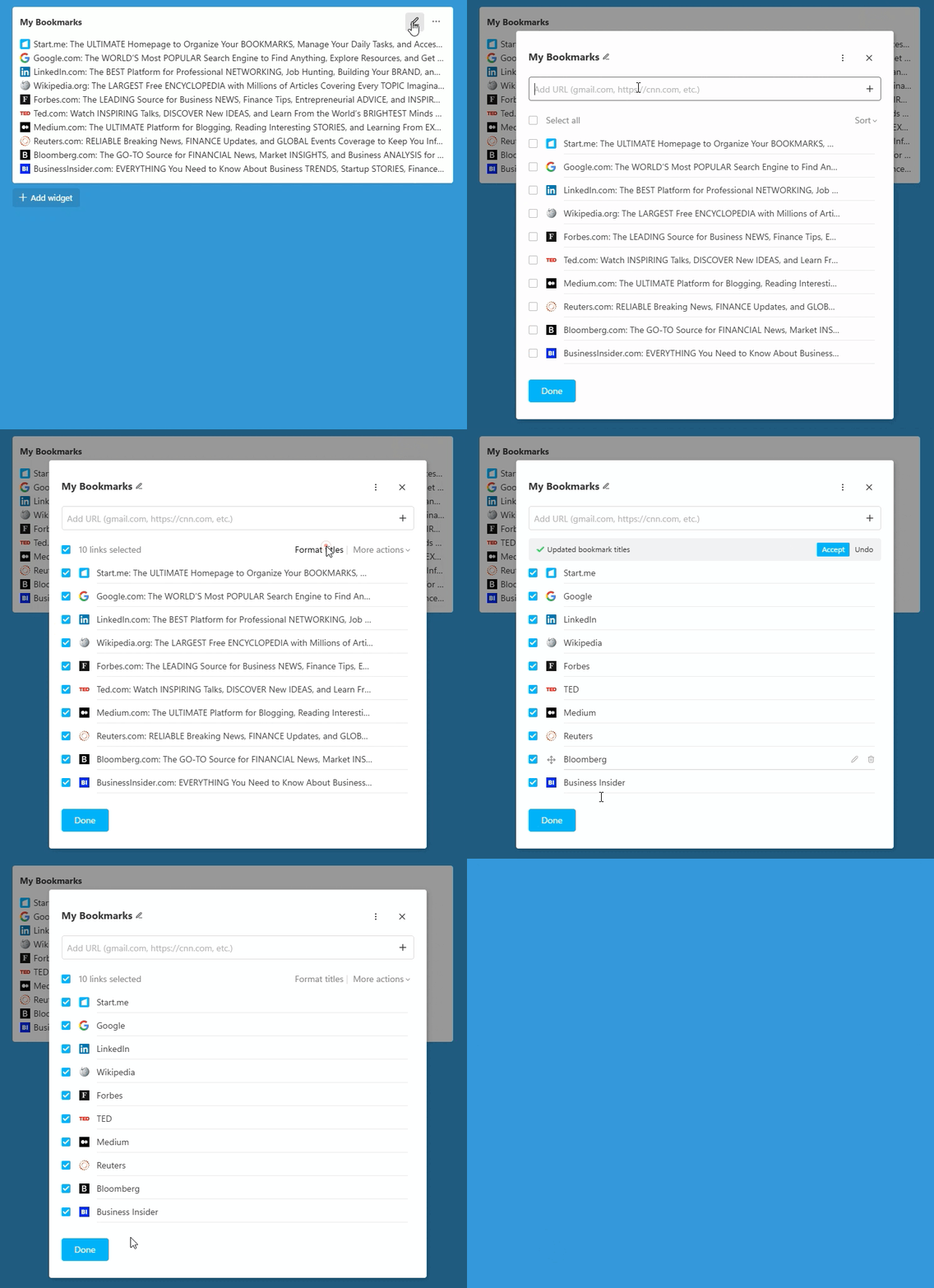
Smart Title Cleanup is an AI-powered feature that refines bookmark titles on your Start.me page, making them shorter, clearer, and more functional.
Why Use Smart Title Cleanup?
- Declutter Bookmark Titles
Many bookmark titles saved from webpages are loaded with SEO keywords and unnecessary details. These can make it harder to find links on your Start.me dashboard, especially when you have hundreds of bookmarks. Until today, you had to do this manually, one bookmark at a time. - Improved Navigation
Clean, concise titles help you identify and retrieve your saved links faster. - Unify Your Style
With a variety of formatting options, you can create a consistent look across your page, and make it more visually organized.
How Does It Work?
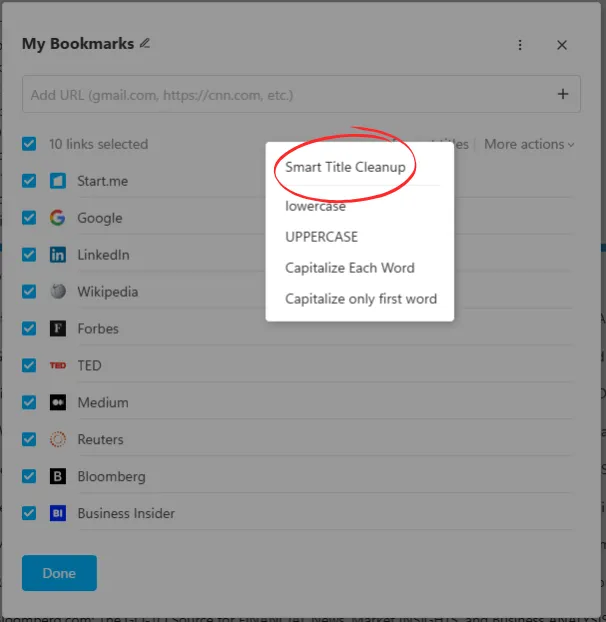
Instructions
- Open the Edit Modal
With the mouse pointer, go to the top-right corner of the Bookmarks widget you want to clean up. The pencil icon will appear; click it. - Select bookmarks
Now you can select the bookmarks from which you want to clean up the titles. You can select just one, more than one, or all bookmarks. - Format titles
Once you’ve selected one or more bookmarks, you’ll see the Format titles option. When you click it, you’ll see the new menu. The first option is Smart Titles Cleanup. - Other Options
Customize your bookmark titles further by choosing from formatting styles:- lowercase – gets rid of all capitals
- UPPERCASE – convert all characters into capital letters
- Capitalize Each Word
- Capitalize only first word
- Undo Changes:
Not happy with the results? Before we apply your choice, you can undo changes and return to the previous settings.
Note: when you apply this feature to a lot of bookmarks at once, it might take some time.
Available to PRO Users
Smart Title Cleanup is available exclusively to PRO users. Not a PRO user yet? Upgrade now and unlock this feature along with many other benefits.
We Want to Hear from You!
Let us know what you think of this feature and share your ideas for what you’d like to see next. Together, we’re making Start.me smarter and more user-friendly!
12 Replies to “Start.me Just Got Smarter: Introducing AI-Powered Smart Title Cleanup”
This is a brilliant feature, thank you!!
I hit the ‘Daily Limit’ for Smart Title Cleanup.
1. Is this permanent?
2. What is the limit?
3. It’s not mentioned in the blog article, as far as I can see.
Hi Tom, thanks for your comment! We’re thrilled you think the new feature is brilliant! We capped it initially to manage costs as we roll it out gradually. The good news? We’re doubling the limit this week! Also, the limit you mentioned resets daily, so you can enjoy it fresh every day! 😊
Dear Stefan,
First, congratulations on this new feature! It is a feature I have always wanted (I used to edit the link titles manually each time) but it seems that only the advent of AI made it possible.
I would like to give you some feedback:
– I am afraid the feature is hidden. I could not find it initially and had to reread your blog post. The problem is that the “Format titles” link is not visible until some links are selected. This makes the feature less discoverable, despite is usefulness.
– The link titles follow this pattern: “YouTube – Video Title” or “Amazon – Book Name”. This is usually what the user wants, but with some well-known services (YouTube, Amazon, etc.) the icon is enough for the link to be recognizable. I think a configuration button to omit the site names for well-known sites could be helpful.
– And, most importantly – I believe that should be an option to activate the functionality automatically when a new link is added, whether through the web interface, a browser plugin, or the Android app. In its current state, when the user collects links from different sources, he or she is required to go to the web site later and format the link. I think doing it at the time of link creation would keep the collection tidy from the start.
Thank you for your hard work!
Hi Peter,
Thank you so much for your valuable feedback and kind words! Here’s my initial response:
– I agree that the new feature isn’t immediately visible. This was intentional—we aimed to avoid overloading the UX and prevent annoying our free users (since it’s a PRO feature). That said, we may have been too subtle here. I’ll discuss with Arjen how we can improve this.
– Adding a configuration button is a valid suggestion. For now, if you want to hide titles, you can do this already: go to Display settings, select Icons > Titles > Hide titles.
– Your suggestion about keeping links tidy from the start is spot on! This is a high priority for us, but with over 300 million unique URLs in our database, it’s a complex and resource-heavy challenge. The current AI solution does harmonize bookmark titles contextually, so if you ask it to clean up 10 at once, it performs better than working on them individually.
I hope this addresses your questions! Thanks again for your thoughtful feedback, Peter. 🙏
Love it!
Wonderful to hear this, Janet!
That’s actually really clever and useful – thank you for this feature 🙂
Thanks so much for letting us know, Lars!
perfect
Thanks, Pál Sántha!
Is there no place we can get away from the scourge of AI?
Hi Astrid, thanks for commenting! We made this feature completely optional, so if you don’t want to, you don’t have to use it at all. Can you explain why you don’t like it?