
Adding Sites Just Got Easier with AI
We’re thrilled to introduce AI Site Suggestions, a new feature for PRO users that makes adding sites to your Start.me page easier than ever. Integrated directly into the Bookmark Edit Modal, this feature helps you discover and add new links in seconds.
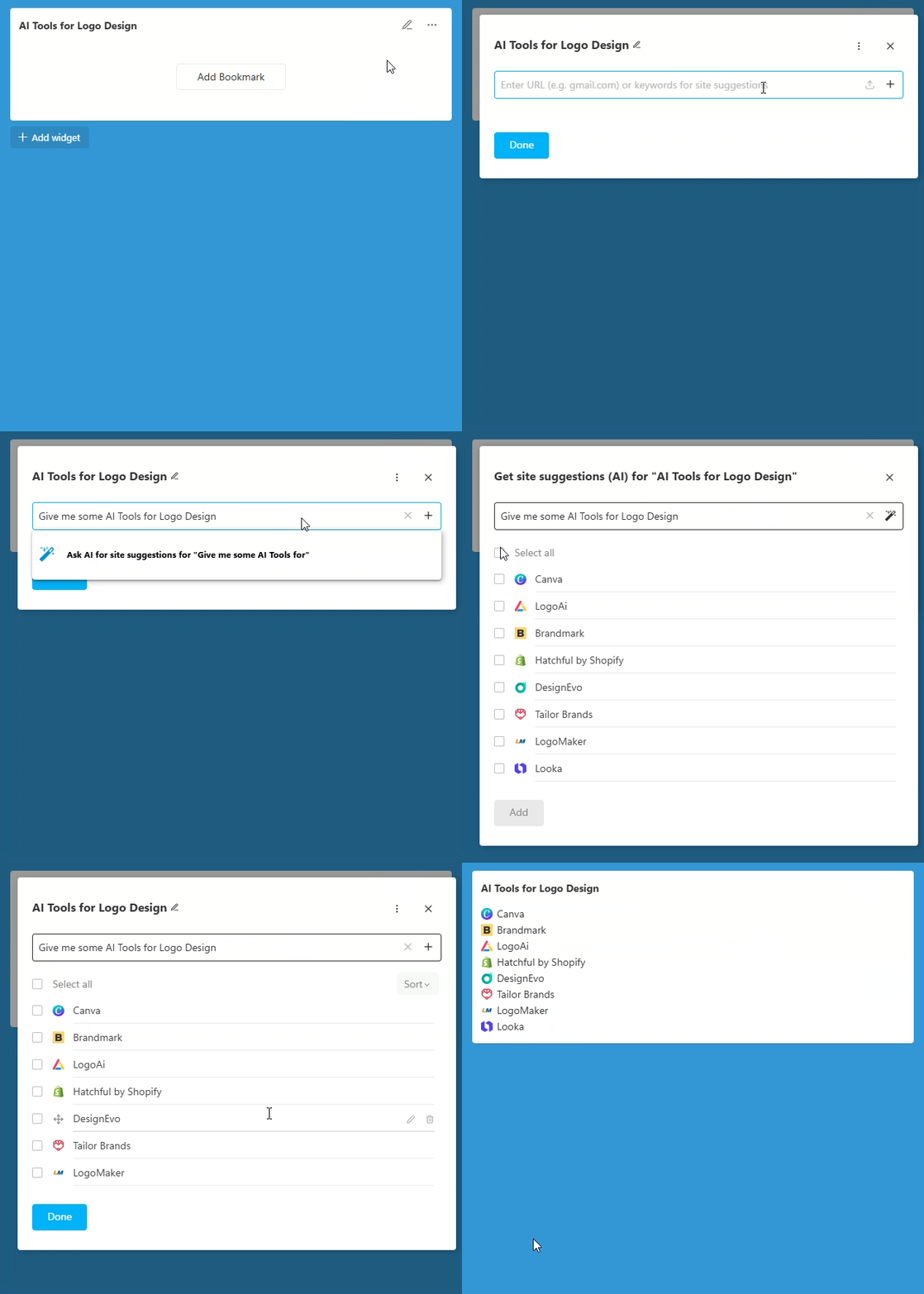
Using AI and our index of over 100 million websites, you can type what you’re looking for—no need for tedious searching or guessing—and we’ll suggest high-quality sites tailored to your needs.
How it works
Adding sites with AI Site Suggestions is simple:
- Go to the destination Bookmark widget on your Start.me page and click the pencil icon.
- In the add link field, type what kind of site suggestions you want to get (for example: “Best sites for photography tips”).
- Click the Ask AI for site suggestions for [your prompt]-button.
- Now our AI will present a list of Site suggestions. To add them to your widget, select the ones you like, or click Select all.
- Click Done to confirm.
Example Prompts to Try
Feel free to experiment with different prompts, to get the best possible results.
- “Top 10 sites for space ships in the US” – Find websites about space exploration and technology.
- “Alternative sites for My Yahoo” – Discover great alternatives to My Yahoo for organizing your news and interests.
- “Best blogs for healthy recipes” – Discover blogs that share nutritious and delicious recipes.
- “Popular sites for learning French online” – Get links to tools and courses for learning French.
- “Resources for small business marketing” – Access helpful tools for marketing your business.
- “give me top 5 AI tools for editing of photos” – To help you get started with your photo collection.
- “What are the best OSINT tools for social media research?” – To quickly get to the most relevant Open Source Intelligence Resources.
Note: this feature relies on a single AI prompt, and will also verify the results in our Start.me database. It’s not a regular chat window, so you can’t ask follow up questions.
What do you think?
With Smart Title Cleanup and now AI Site Suggestions, we’re starting to roll out more features powered by AI—designed to help you organize, save, and access bookmarks more effortlessly on Start.me.
We hope you’ll give it a try and see how it can enhance your Start.me experience. Have ideas for new AI-powered features? Let us know in the comments—we’re always listening!
16 Replies to “Adding Sites Just Got Easier with AI”
I like the idea ! And am looking forward to it getting better over time. News browsers have gotten unspeakably awful over time !
We’ll do our best to improve. And if you have any suggestions or requests, don’t hesitate to let us know!
Not working for me. I entered “information broker sites”, got the AI suggested sites prompt, hit that, got “Something went wrong”, “No results found”.
Tried various other wordings, same result.
Thanks for informing us Richard – this should now be fixed!
Great, fast and everything is clear
Glad you like it, Alex!
This is a great new addition to an already great site. Thank you for keeping improving it.
Thanks so much, Martijn, for your support!
This is great! I love how you continue to improve start.me!
That’s what we love to do for our customers, Harley Jay! And we’re not done yet!
The ability to add an app using a “Private” Profile option does not appear to be available. Only a “Primary” Profile appears to be available as far as I can determine.
Thanks for commenting, Mike! Not sure what you mean with Private or Primary Profile. Can you explain? We’re interested!
You must be aware each app has a “Profile” setting!
Just edit an app and you will have many “settings” – right?
Under “Solution home” > ” General” > “Getting started” – you will find the:
“Profiles (Feature)” explained in your “Help” (in Edit Mode, by clicking on the “?” – as you must know) that can be found by clicking on the “?” (help) that then provides this info (in your website “solutions”) on this subject as “Modified on: Fri, 18 Oct, 2024 at 4:05 PM”.
When adding a “new” app – the only optional setting for “Profiles” that I am able to observe is “Primary”.
As your “Help” describes “Profiles”; there are four settings for “Profile” for each app:
quote” “There are four main Profiles: ‘Primary’ (default profile), ‘Inherit from Workspace’ (only for nested elements), ‘Private’ (isolated session), and ‘Incognito’:” with a screen-shot (in your “Help”) that displays the app using the “Profile” setting set to use “Private”.
When I had an app – the only “Profile” setting provided for the “new” app is the default “Primary”.
I want to use “Private” for my “Profile” setting for the “new” app. Again, the only optional setting for the “Profile” settings appears to be the default Profile “Primary” (even though there are supposed to be four options for an apps “Profile” (as discussed in your “Help” regarding “Profile feature”).
I’m not quite sure how there could be any confusion on your end – “Profile” is one of many optional settings for all apps in Rambox (among the many settings available for all apps that are used in Rambox).
I certainly hope this helps serve to bring more clarity (that seemed obvious to me….).
Note: for some reason my “reply” ended up in the wrong place (the first time) – I’m attempting to “reply” successfully to the appropriate comment this time around.
Hi Mike,
Thanks for your comment! It looks like there’s some confusion—Start.me is not connected to Rambox, and our platform does not have the same “Profile” settings you mentioned. If you’re experiencing this issue in Rambox, I’d recommend reaching out to their support team for clarification.
If you were referring to a feature on Start.me, feel free to share more details, and we’ll be happy to help!
Best, Stefan
NICE ADDTION NO SHARE BUTTONS YET?
Thanks, John, for mentioning it’s a nice addition. Where would you like us to add the share buttons?